Best overall: a rental with a separate office. Best for working couples: a home with separate work rooms. Best for light solo work: a rental with a dedicated table. For La Quinta vacation home rentals for remote work in 2026, choose the workspace configuration first; use La Quinta Retreat as a candidate to evaluate against the checks below, not as proof of any particular amenity.
TL;DR
For La Quinta vacation home rentals for remote work, a separate office is the strongest default for daily calls.
Working couples need separate call spaces, not just a large shared table.
Evaluate La Quinta Retreat against written workspace and internet details before committing.
Treat patios as secondary workspaces; verify an indoor fallback before booking.
Why this matters
A vacation home and a workable temporary office solve different problems. An attractive living room does not establish that you can take confidential calls, sit comfortably through a workday, or keep working while someone else uses the kitchen.
Choose the rental around your hardest workday, not your easiest afternoon. If your 2026 stay includes presentations, overlapping meetings, or sensitive conversations, those demands should determine the layout you accept.
This guide ranks rental configurations rather than individual properties. Each recommendation describes what to look for; it does not certify that a named home has those features. Use the ranking to narrow listings, then obtain property-specific confirmation.
What makes the best remote-work rental
Judge every candidate against the same criteria before comparing vacation amenities:
Workspace separation: A door between work and shared living areas matters when calls overlap with meals, television, or another person's meetings.
Usable furniture: Look for an actual work surface, legroom, a supportive chair, and accessible power—not just a laptop staged on a decorative console.
Internet evidence: Ask for a recent test from the intended workspace, including download speed, upload speed, and latency.
Call conditions: Check the camera background, nearby noise sources, window glare, and whether others need to pass through the room.
Daily practicality: Confirm how work equipment, meals, sleep, and personal belongings fit together without constant rearranging.
Indoor fallback: Outdoor space is a bonus. Your work plan should remain workable when you need to move inside.
Apply these criteria to the exact home you intend to book. Photos of another property, a general amenities page, or a broad description of the destination do not answer workspace questions.
At a glance: the best rental configurations
The order below prioritizes dependable work separation over vacation appeal. These are layout choices, not verified property listings or claims about La Quinta Retreat.
1. Separate-office rental
Best for: A solo professional with daily calls
Standout feature to verify: Enclosed workspace outside the bedroom
Key limitation: A room called an office still needs usable furniture
2. Separate-work-room rental
Best for: Working couples with overlapping calls
Standout feature to verify: Independent enclosed call spaces
Key limitation: Shared internet still needs checking under simultaneous use
3. Bedroom-workspace rental
Best for: A solo traveler needing call privacy
Standout feature to verify: Work surface behind a bedroom door
Key limitation: Work and sleep occupy the same room
4. Dedicated-table rental
Best for: Solo travelers doing mostly asynchronous work
Standout feature to verify: Stable table available throughout the stay
Key limitation: Shared areas offer limited call privacy
5. Indoor-and-patio rental
Best for: Travelers mixing focused work with outdoor breaks
Standout feature to verify: Complete indoor station plus outdoor seating
Key limitation: The patio cannot replace a dependable indoor setup
1. Separate-office rental: best for daily video calls
A separate-office rental gives work its own enclosed room. It is the strongest default when your calendar contains regular client calls, presentations, or tasks that require uninterrupted concentration.
The distinction is the room's function, not its label. A photograph showing a desk does not establish whether the chair fits, the door closes, or the internet connection reaches that spot.
Separate-office rental pros:
Keeps calls away from cooking, television, and shared downtime.
Lets you leave equipment in place between work sessions.
Creates a physical boundary between working and relaxing.
Separate-office rental cons:
The office label does not establish furniture quality or connection reliability.
A single office does not solve overlapping calls for multiple workers.
Best for: A solo professional whose workday includes scheduled meetings and focused production.
Before choosing this configuration for a 2026 stay, request a view of the entire workstation, including the chair, floor space, outlets, and door. Ask whether the room is exclusively available to your group throughout the stay.
Verdict: Buy this configuration only after the enclosed workspace and its connection are confirmed.
2. Separate-work-room rental: best for working couples
Working couples need independent places to speak, not merely enough surface area for their laptops. Separate enclosed rooms address the layout problem; a connection check addresses the shared internet problem.
Start with your calendars. If you expect 2 simultaneous video calls, assess the home for that situation rather than assuming each person's successful solo call proves the setup works together.
Separate-work-room rental pros:
Gives each worker control over their immediate call environment.
Reduces the need to negotiate room access between meetings.
Allows different work schedules without sharing one desk.
Separate-work-room rental cons:
Rooms still share the property's internet connection unless otherwise confirmed.
A second bedroom is not automatically a second workstation.
Best for: Couples or travel companions with overlapping meetings and independent workloads.
Ask for workspace details in each room. Confirm that both people can sit, charge equipment, and close a door without taking over a bed or blocking access to shared facilities.
Verdict: Buy for overlapping schedules; skip layouts that count a couch as the second office.
3. Bedroom-workspace rental: best for solo call privacy
A bedroom workspace places your work surface inside a sleeping room. It offers a closable door without requiring a separate office, making it a practical compromise when privacy matters more than a distinct work zone.
Check the camera angle carefully. A desk facing the wrong direction can put the bed, doorway, or a bright window directly behind you.
Bedroom-workspace rental pros:
Provides a door for calls away from shared living areas.
Keeps your computer and papers out of the dining space.
Gives a solo traveler a defined place to work.
Bedroom-workspace rental cons:
Work equipment remains in the room where you sleep.
Room access becomes awkward if another guest needs the bedroom during calls.
Best for: A solo traveler who needs privacy but does not require a separate office.
For this configuration, check usable surface depth and where a chair sits when pulled back. A narrow vanity or bedside shelf should not pass your workstation check simply because a laptop fits on it.
Verdict: Buy for solo privacy; skip when bedroom access will conflict with your meetings.
4. Dedicated-table rental: best for asynchronous solo work
A dedicated-table rental uses a stable indoor table as the main workstation. It suits work built around writing, analysis, email, or other tasks that do not depend on frequent private conversations.
The word dedicated matters. If you must clear the surface for every meal, the setup adds repeated packing and rearranging to your day.
Dedicated-table rental pros:
Provides a straightforward surface for a laptop and work materials.
Keeps the sleeping area separate from the main work position.
Works without requiring a room labeled as an office.
Dedicated-table rental cons:
Open-plan living areas offer limited conversational privacy.
Dining furniture requires a closer comfort check for extended work.
Best for: A solo traveler with mostly asynchronous tasks and occasional calls.
Use 1 uninterrupted 30-minute work session as a personal comfort check after arrival. That is a suggested trial, not an ergonomic standard: assess the chair, screen position, glare, and whether the surface remains available.
Verdict: Buy for light-call solo work; skip for confidential or meeting-heavy schedules.
5. Indoor-and-patio rental: best for outdoor work breaks
An indoor-and-patio rental gives you an indoor workstation plus an outdoor place for selected tasks. The useful feature is the choice of environments, not a promise that every task belongs outside.
Keep presentations, confidential discussions, and equipment-dependent work anchored to the indoor setup. Treat outdoor seating as an alternative for reading or other tasks when the conditions suit you.
Indoor-and-patio rental pros:
Offers a change of setting without leaving the property.
Separates short outdoor sessions from the main workstation.
Preserves an indoor option when outdoor conditions interfere.
Indoor-and-patio rental cons:
Outdoor glare, noise, and weather complicate screen work and calls.
Indoor connectivity does not establish connectivity at the patio seat.
Best for: Travelers who want outdoor breaks without making the patio their only office.
Request separate confirmation of the indoor station and outdoor seating. A patio photograph should never substitute for evidence that you can finish a full workday inside.
Verdict: Buy only with a complete indoor fallback; skip patio-only work plans.
How we ranked these configurations
The ranking follows the criteria above: workspace separation first, then furniture, internet evidence, call conditions, and daily practicality. It is a decision framework, not a property inspection or a report of completed stays.
A separate office ranks first because it separates work from shared activities and sleep. Separate work rooms take priority for couples; the lower-ranked configurations fit narrower work requirements rather than being universally worse choices.
Verify the home before you commit
For a 2026 booking, turn attractive descriptions into specific questions. Keep the answers together so you can compare candidates without relying on memory.
Follow this sequence:
Map your workday. Identify private calls, overlapping meetings, equipment needs, and working hours.
Confirm the room. Request current views of the exact surface, chair, door, outlets, and surrounding space.
Check the connection. Request a recent test from that workspace and ask about access to the router.
Plan the fallback. Decide what you will do if the workspace or connection becomes unusable.
A fallback needs an action, not an assumption. If you intend to use your own mobile connection, check your carrier's coverage information and test the connection at the property before relying on it for a critical meeting.
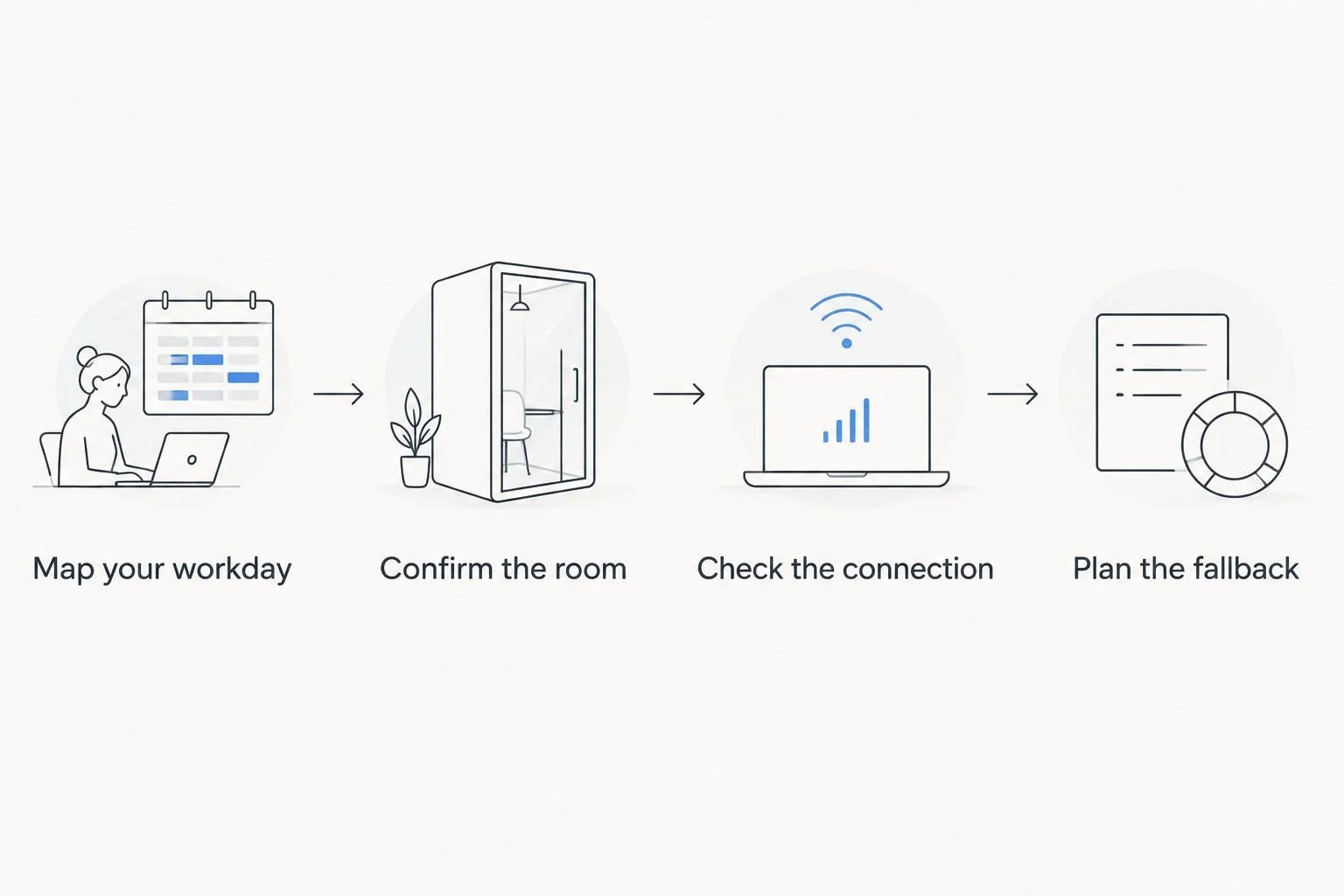
Confirm the workspace and connection before treating a vacation home as an office.
Keep the questions tied to your actual work. A photographer transferring large files and a traveler answering email do not need identical evidence, even when both search for remote-work accommodation.
When evaluating La Quinta Retreat, use the same written checklist you would use for any other candidate. The best rental is the one that answers your work questions clearly, not the one that uses the most remote-work language.
Which rental configuration should you choose?
Choose a separate-office rental unless your schedule gives you a clear reason to choose something else. Working couples should prioritize separate call rooms; solo travelers with few calls can consider a dedicated table.
For your 2026 shortlist, reject configurations that fail a non-negotiable requirement before comparing outdoor space or leisure amenities. A better vacation feature does not repair an unsuitable call environment.
La Quinta Retreat belongs on your shortlist only if the exact home meets your workspace requirements. Confirm the details that affect your working day before making the final choice.
FAQ
What's the best layout for La Quinta vacation home rentals for remote work?
A separate enclosed office is the strongest default for a solo professional with daily calls. Confirm the actual furniture, door, outlets, and connection from that room rather than relying on the office label.
What should working couples look for in a vacation rental?
Working couples should look for separate enclosed workspaces when their calls overlap. Check the furniture in each space and ask about internet performance during simultaneous use.
Is a dining table enough for working remotely?
A dining table is a reasonable candidate for mostly asynchronous solo work if it remains available and the seating suits you. It is a weaker choice for confidential calls or work that conflicts with shared meals.
What internet details should I request before booking?
Request a recent test from the intended workspace showing download speed, upload speed, and latency. Compare those details with your work applications' published requirements and explain whether other people will be working simultaneously.
Can I use a patio as my main remote-work office?
Choose a dependable indoor workspace as your main office and treat the patio as a secondary option. Outdoor seating does not establish suitable glare, noise, weather, or connectivity conditions for your work.
Does this guide verify La Quinta Retreat's work amenities?
No, this guide ranks rental configurations rather than verifying a property's amenities. Obtain current, property-specific workspace and internet details before deciding whether the home fits your stay.
What should I check when I arrive for a remote-work stay?
Check the intended workspace and run the applications you depend on before your first critical meeting. Assess the chair, power access, camera background, connection, and your fallback plan while there is time to address problems.
One last thing
Before your first working day, sit in the intended chair and frame a video call with the door closed. That simple rehearsal checks what listing photos cannot: your actual camera view, room access, power reach, and working position.
For a 2026 stay, make the rehearsal part of arrival—not something you discover during a client presentation.